I really liked how the reading emphasized that creative projects do not require hightech, expensive materials and tools. Not every classroom is equipped with a laser cutter and a 3D printer. Most classrooms are underfunded for supplies and educators pay out of pocket for many basic necessities. If an art teacher is convinced that the only way to involve technology in their curriculum is if they personally pay for an expensive piece of equipment, then it probably will not happen. Utilizing basic technological sources, like word processing and online publishing, allow educators to use technology without breaking the bank and give students a new creative outlet.
In the second reading, the story about "Googling the Error" really resonated with me because it is something that I grew up with, but I had to teach it to my parents. Whenever I have a problem with the computer or the wifi or the television, I google the problem and find the solution online. My ability to solve problems this way made my parents think I was very technologically savvy and they often asked me for help. When I went away for college, I had to teach them how to google problems for themselves because it seemed illogical for them to call me just to have me google it. I had no more knowledge than they did and we both had access to the internet so really they were just as capable of solving the problem.
Tuesday, April 5, 2016

HW10.3 Blog Comments
Blogs I commented on:
Anita
Nina
Ava
Carrianna
Teny
Leying
Jihyun
While commenting on everyone's blogs I was most drawn to the works that people said were based on ideas or pieces that they had worked with before. Clearly they were comfortable with the theme or aesthetic that they knew and used that comfort to help them with a new, unfamiliar medium.
HW10.1 Laser Cutting Project

I really enjoyed this project. Laser cutting is an amazing medium that presents so many possibilities. Besides being able to cut nearly any design with the laser, my favorite part of working with the laser cutter was the multitude of materials that could be cut. Cardboard, wood, foam, and plexiglass were all at our disposal and each reacted slightly differently to the laser. I chose cardboard for this project because I liked that it made the piece seem casual and unlike an art object. To see an intricate design on such a simple material creates an intriguing contrast. I also chose to work with etching and not cutting because I though it would make the small details of the design stand out more. I like to think that this could be used by a paranormal investigator on the go. I really loved working with Sohee and Andrew because they gave such clear and concise instructions that made the intimidating process very easy to understand.
Tuesday, March 29, 2016
HW9.2 Scratch Experience and Classroom Connections
I enjoyed working with Scratch and I can see why an artist would be attracted to working with programming. There are so many possibilities with the code if you know how to manipulate it correctly.
- Working with scratch can be summed up in three words: "trial and error." I made many mistakes and had to replay my animation again and again to find where I had errors in the code. Most of all, I needed time to work through the mistakes and teach myself. Similarity, in an art classroom, students not only need instruction, materials, and motivation, they also need time to work with the medium and allow themselves to make mistakes. This especially true when using new media materials because students will have less familiarity with them. Giving students plenty of time to emerge themselves in the activity is essential for technology to work in the classroom.
- Although I did not choose to make a game while using Scratch, the ability to do so is a great application of the program. I think it is a wonderful opportunity for artists to create interactive works of art, allowing their audience to truly be involved in the process. Likewise, in a classroom it is important to remember that students will want to be a pert of the lesson. Simply lecturing to a classroom will not inspire the same enthusiasm as creating a lesson that incorporates interactivity. Allowing students to provide examples and ask questions during the instructional session will keep them attentive and add to their experience.
HW9.3.2 Programming Artist Research: Nick Briz
Nick Briz is an artist who uses programming to create algorithms for art and tear apart code in order to create glitches. In his work, The Coldplay Song Generator, he used code to create an application which creates new songs based on the patterns and formulas of the band Coldplay.


The application can be downloaded on his website.
He also works with Glitch Art, which is a form of art that is interested in the visual results of mistakes and error in code. Briz creates digital works that actively have "badly" written code in order to produce the glitches. Because they are actively desired, the glitches cease to be seen as mistakes and become the focus of the work. In order to make glitches appear in specific ways, the code must be written precisely, so although it is filled with "errors," it still requires extreme programming knowledge and skill.
From The Ground Up In Order, Embrace from Nick Briz on Vimeo.
Sources:
http://nickbriz.com/
http://artcopyright.interartive.org/coldplay-song-generator-copy-drive-sample-chest/
HW9.3.1 Programming Artist Research: Raven Kwok
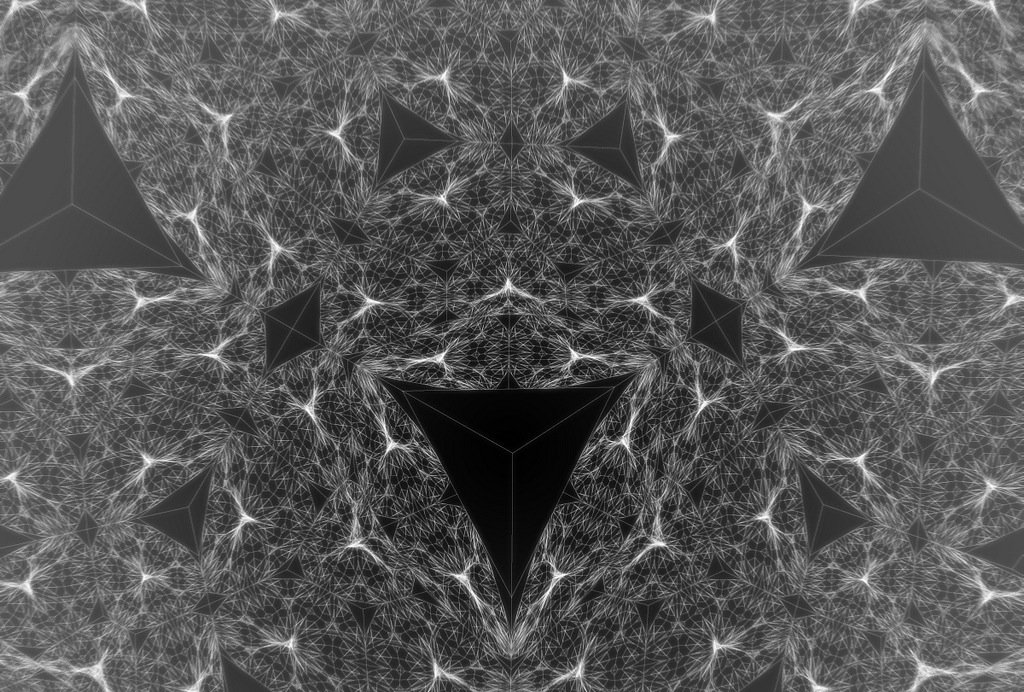
Raven Kwok is a Chinese artist who uses programming to create works of art. Kwok works with the programming software and language known as Processing. Many of his works are studies on fractals and patterns, but others are playful uses of internet memes.

Sources:
http://www.creativeapplications.net/processing/115c8-and-edf0-by-raven-kwok-recursive-and-transforming/
http://thenextweb.com/dd/2012/07/14/if-you-like-programming-and-fine-art-you-will-love-raven-kwoks-work-made-with-processing/#gref
Sources:
http://www.creativeapplications.net/processing/115c8-and-edf0-by-raven-kwok-recursive-and-transforming/
http://thenextweb.com/dd/2012/07/14/if-you-like-programming-and-fine-art-you-will-love-raven-kwoks-work-made-with-processing/#gref
Subscribe to:
Posts (Atom)